
Some messages take two minutes to send and two hours to write: the apology to a friend, the complaint to a company, the polite “no” to your boss. AI can help you find the right words, get the tone right and keep it short, so you can hit send and move on.
Here’s how to write better texts and emails with AI, with prompts for the messages people struggle with most.
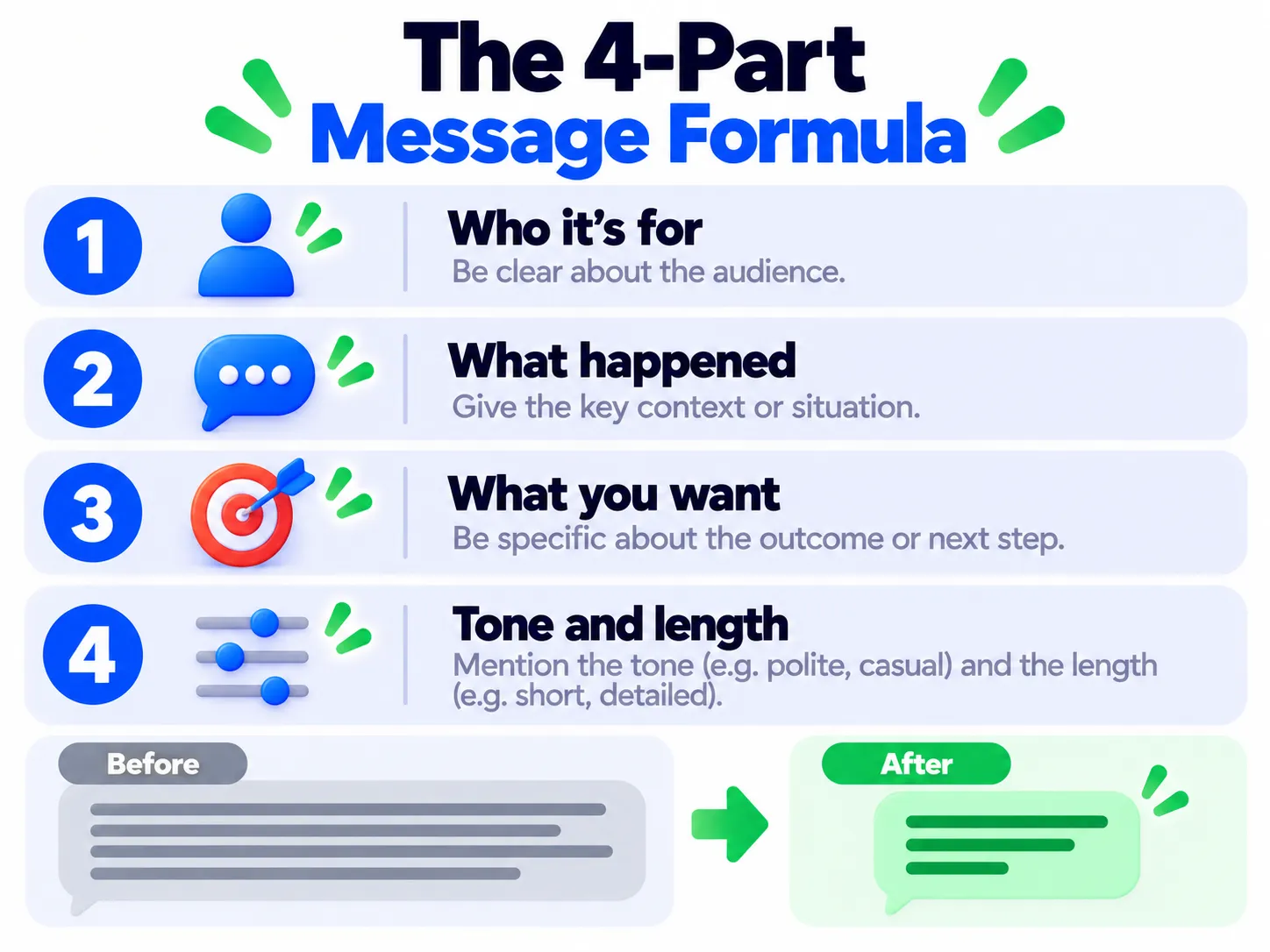
The Simple Formula for Any Message
Give AI four things and you’ll get a much better draft:
- Who it’s for (friend, landlord, customer service, manager).
- What happened in a sentence or two.
- What you want (forgiveness, a refund, more time, a clear answer).
- The tone (warm, firm, formal, casual) and length.
“Write a short, warm text to my friend Priya. I forgot her birthday yesterday. I want to apologize sincerely without making excuses and suggest dinner this weekend. Keep it under 60 words.”
Prompts for Tricky Messages
1. A Sincere Apology
“Help me apologize to my partner for snapping at them after a long day. Take responsibility, don’t over-explain, and end with what I’ll do differently.”
2. A Complaint That Gets Results
“Write a polite but firm email to an airline. My bag arrived 3 days late and I had to buy clothes. Include my booking reference [REF], list what I bought, and ask for reimbursement within 14 days.”
3. A Refund or Return Request
“Write a short message asking for a refund for headphones that stopped working after 2 weeks. Mention the order date, stay friendly, and ask what they need from me.”
4. Saying No Without Guilt
“Help me politely decline a request to join another project at work. I want to stay positive, explain I’m at capacity, and suggest someone or a later date.”
5. A Follow-Up That Doesn’t Sound Pushy
“Write a friendly follow-up email. I applied for a job 10 days ago and haven’t heard back. Keep it to 3 sentences.” Getting ready for the interview itself? See how to prepare for a job interview with AI.
6. A Difficult Conversation Starter
“Help me text my roommate about splitting chores more fairly. I want it calm, specific and not passive-aggressive.”
7. A Heartfelt Thank-You or Condolence
“Help me write a short condolence message to a coworker whose father passed away. Keep it simple and sincere.” For messages like this, use AI for a starting point, then rewrite it in your own words.
Make It Sound Like You
- Paste one or two messages you’ve written before and say, “Match my style.”
- Ask for three versions: “one casual, one neutral, one formal.”
- Cut anything you’d never say out loud. AI loves phrases like “I hope this message finds you well.”
- Use “Make it shorter” freely. Most messages work best under 100 words.
Using Gmail? See how to use AI to write emails in Gmail. On iPhone, built-in Writing Tools can rewrite text in any app (see built-in AI features on your phone).
When Not to Use AI
- Don’t paste private details about other people, account numbers or passwords.
- For legal disputes, contracts or official complaints with deadlines, use AI for a draft but get proper advice for anything important.
- Read every message before sending. AI sometimes invents details or promises you didn’t make.
Frequently Asked Questions
Is it rude to use AI to write personal messages?
Not if the feelings are yours. Use AI to find words, then edit it so it sounds like you.
Which AI is best for writing emails?
Free versions of ChatGPT, Gemini and Claude all write good emails. Claude is especially good at natural, warm tone.
Can people tell my message was written by AI?
Sometimes, if it’s too long or too formal. Short, specific and personal messages rarely sound like AI.
The Bottom Line
AI is like a calm friend who’s good with words. Tell it who, what, what you want and the tone, then edit the draft so it sounds like you. Next time a message has you stuck, try the formula. For more prompt ideas, read how to write better AI prompts.
Related Guides
- How to Use AI to Write Emails in Gmail (Step by Step)
- How to Write Better AI Prompts: A Beginner’s Guide With Examples
- How to Prepare for a Job Interview With AI (Mock Interview Prompts)
- How to Use AI to Understand Confusing Documents (Bills, Leases and Contracts)
Explore more in our AI Writing Tools hub.
Disclaimer: This article is for general information only and is based on details available at the time of writing. Prices, plans, features, release dates, policies and availability can change at any time and may vary by country. Please verify the latest information on the official website of the company or product mentioned before making any decision or purchase. This is not medical, financial, legal or security advice; consult a qualified professional for your situation. Next DigiTech is an independent website and is not affiliated with or endorsed by the companies mentioned; all trademarks belong to their respective owners. We are not responsible for any loss or decisions made based on this content.

