

If you’re still on Windows 10, you’ve probably seen articles warning that your security updates stop in October 2026. Here’s the thing: that’s no longer true.
Microsoft quietly extended its consumer Extended Security Updates (ESU) program by a full year, to October 12, 2027 (Help Net Security). A lot of guides still haven’t caught up. Here’s what it means for you and what to do next.
What Actually Happened
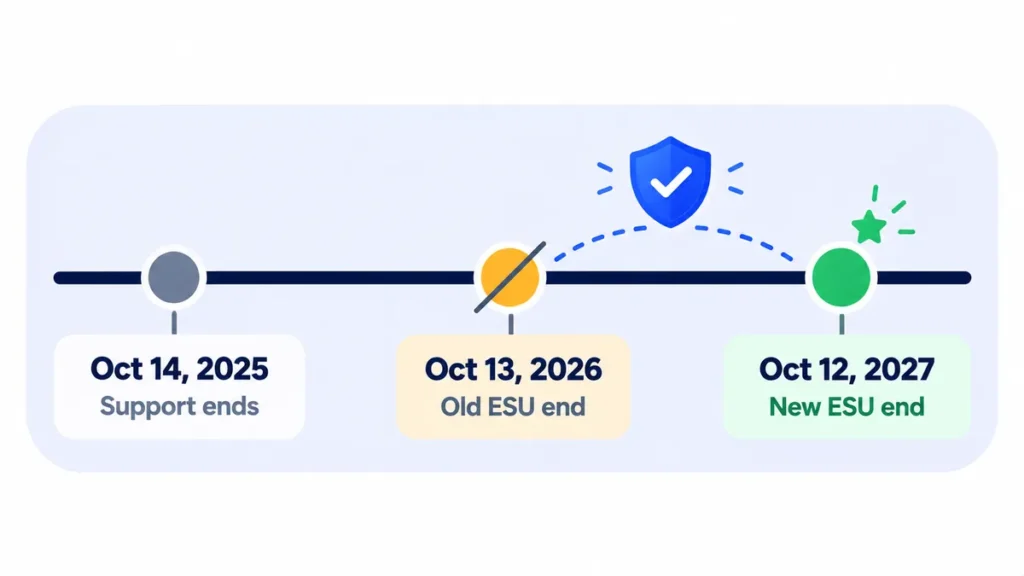
- October 14, 2025: Regular Windows 10 support ended.
- The ESU program launched to give home users one more year of security updates, originally ending October 13, 2026.
- June 2026: Microsoft extended consumer ESU to October 12, 2027. You can enroll any time until then.
Already enrolled? You don’t need to do anything. Microsoft says your coverage continues automatically through the new date.
Note: Release dates and rollout timing can change. Please confirm the latest details on the official website or help center.
Is Your PC Eligible?
According to Microsoft’s requirements, your PC needs to:
- Run Windows 10 version 22H2 (Home, Pro, Pro Education or Workstation).
- Have the latest Windows updates installed.
- Be signed in with a Microsoft account that has administrator rights. Child accounts can’t enroll.
To check your version, press Windows key + R, type winver, and press Enter.
3 Ways to Enroll (Two Are Free)
- Turn on Windows Backup to sync your PC settings. No extra cost.
- Redeem 1,000 Microsoft Rewards points.
- Pay $30 (plus tax) for a one-year license, which can cover up to 10 devices.
To enroll, open Settings > Update & Security > Windows Update and look for the Enroll now link. Follow the prompts and pick the option that suits you.
Note: Prices are based on official announcements at the time of writing and may vary by country, retailer, taxes and promotions. Always check the latest pricing on the official website before buying.
What ESU Does (and Doesn’t) Cover
ESU gives you security updates only. You won’t get new features or general technical support. Microsoft 365 apps on Windows 10 keep getting security updates on their own schedule, until October 10, 2028 (BigGo).
Running Windows 10 without ESU means no security patches at all. That’s risky, especially for online banking and shopping.
Should You Still Plan to Upgrade?
Yes. ESU buys time, not a permanent fix. Use the extra year wisely:
- Check if your PC can run Windows 11 with Microsoft’s free PC Health Check app. If it can, the upgrade is free.
- If it can’t, start budgeting for a new PC before October 2027. Watch for holiday sales.
- Back up your files now, so moving to a new machine is easy whenever you’re ready.
Frequently Asked Questions
Do Windows 10 security updates end in October 2026?
Not anymore. Consumer ESU now runs until October 12, 2027.
Is Windows 10 ESU free?
It can be. Turning on Windows Backup or redeeming 1,000 Microsoft Rewards points both get you enrolled at no extra cost.
I already paid $30. Do I need to pay again?
No. Microsoft says enrolled devices are automatically covered through October 12, 2027.
The Bottom Line
Windows 10 users just got a bonus year. Enroll in ESU if you haven’t, then use the time to plan your move to Windows 11 without the rush.
Related Guides
- Should You Update to iOS 27 Yet? What to Check First
- Should You Update Right Away? A Simple Guide to New Software Releases
- How to Speed Up a Slow Laptop in 10 Minutes (Windows and Mac)
- Black Friday 2026 Laptop Buying Guide: Specs That Matter and Deals to Avoid
Explore more in our Software Updates Explained hub.
Disclaimer: This article is for general information only and is based on details available at the time of writing. Prices, plans, features, release dates, policies and availability can change at any time and may vary by country. Please verify the latest information on the official website of the company or product mentioned before making any decision or purchase. This is not medical, financial, legal or security advice; consult a qualified professional for your situation. Next DigiTech is an independent website and is not affiliated with or endorsed by the companies mentioned; all trademarks belong to their respective owners. We are not responsible for any loss or decisions made based on this content.

