

Android 17 is the latest version of Android. It arrived on Google Pixel phones first and is now reaching Samsung, Motorola, Nothing and other brands. It brings floating app windows, better privacy controls, new anti-theft tools and, on some high-end phones, a deeper AI system called Gemini Intelligence.
Here’s what’s new, which phones get Android 17, when to expect it, and how to install it.
Quick Facts
- Released: June 16, 2026, on Google Pixel phones.
- First big update: Android 17 QPR1 reached Pixels on September 15, 2026, with a redesigned volume panel, Power menu and Quick Settings.
- Samsung: Android 17 arrives as One UI 9, now rolling out to Galaxy S26, S25, S24 and recent foldables.
- Price: Free, like all Android updates.
Note: Release dates and rollout timing can change and may vary by phone model, country and carrier. Please confirm the latest details on your phone maker’s official website or support page.
Best New Features in Android 17
- Bubbles for any app: Turn almost any app into a small floating window, so you can reply to a message or check a map without leaving what you’re doing. On tablets and foldables, bubbles dock in a bar.
- Screen Reactions: Record your screen and your selfie camera at the same time, great for tutorials and gaming clips. See our guide on how to screen record.
- Stronger anti-theft protection: “Mark as lost” in Find Hub locks a missing phone with your fingerprint or face, and there are stricter limits on PIN guessing.
- Better privacy: Give an app your precise location only temporarily, and share just selected contacts instead of your whole address book.
- Improved scam and malware protection: Upgraded Live Threat Detection and Advanced Protection mode.
- Smaller touches: Hide app names on the home screen, a separate volume for your voice assistant, an expanded dark theme and more Parental Controls.
- Coming later: A foldable gaming mode (game on the top half, controls on the bottom) is due “in the coming months.” A “Pause Point” feature to interrupt endless scrolling has been delayed.
Note: Features may vary by phone brand, model, region and software version, and can change at any time. Check your phone maker’s official help center for the latest information.
What Is Gemini Intelligence?
Gemini Intelligence is a deeper set of on-device AI features built into Android 17 on select high-end phones. It includes task automation across apps, a voice note feature called Rambler, and Proactive Assistance (formerly Magic Cue), which suggests helpful info at the right moment.
It needs powerful hardware (12GB+ RAM and a flagship chip). Confirmed phones so far are the Pixel 11, 11 Pro, 11 Pro XL and 11 Pro Fold, plus the Galaxy Z Flip8, Z Fold8 and Z Fold8 Ultra. Other phones still get Android 17 but may not get Gemini Intelligence. For AI features you can use today, see the best built-in AI features on your phone.
Note: Gemini Intelligence features and supported devices may vary by region, language and app version, and can change at any time. Check Google’s or Samsung’s official help center for the latest information.
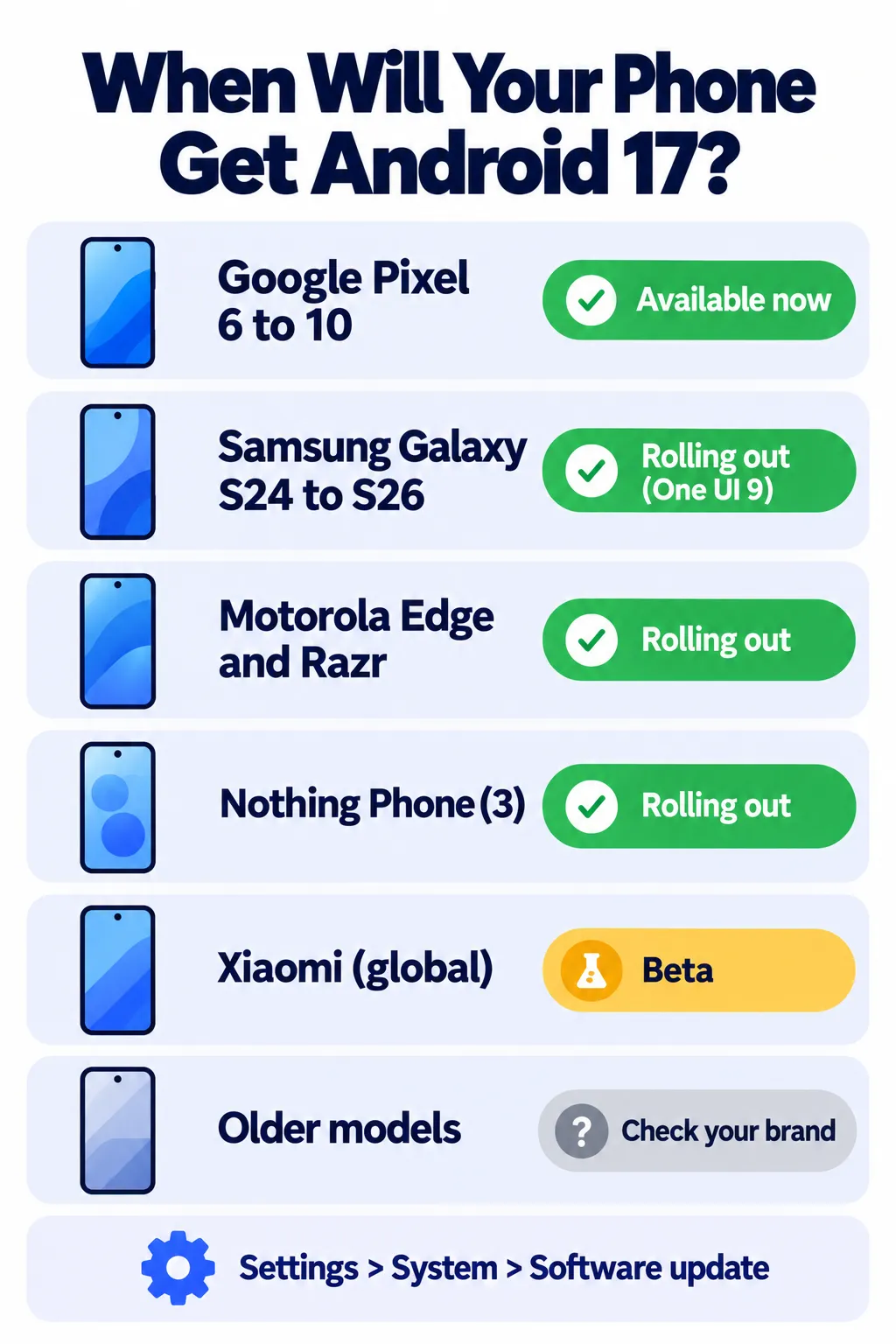
Which Phones Get Android 17?
Google Pixel (available now)
Pixel 6, 6 Pro, 6a, Pixel 7, 7 Pro, 7a, Pixel 8, 8 Pro, 8a, Pixel 9, 9 Pro, 9 Pro XL, 9 Pro Fold, 9a, Pixel 10, 10 Pro, 10 Pro XL, 10 Pro Fold, 10a, Pixel Fold and Pixel Tablet. The Pixel 11 series ships with it.
Samsung Galaxy (One UI 9, rolling out)
- Galaxy Z Fold8 and Z Flip8: Launched with One UI 9 in July.
- Galaxy S26 series: Rolling out since mid-September.
- Galaxy S25, Z Fold7 and Z Flip7: Rolling out since late September.
- Galaxy S24, Z Fold6, Z Flip6 and A57: Started in October, including some US carriers.
- Galaxy S23 FE and older models: Expected in the coming weeks and months. Timing varies by country and carrier.
Other Brands
- Motorola: Rolling out to Razr and Edge models and many Moto G phones, starting with the Edge 2025.
- Nothing: Nothing OS 5.0 (Android 17) is rolling out to the Phone (3) first, with other models to follow.
- Xiaomi: HyperOS 4 (Android 17) is stable in China only for now; global phones are still in beta.
- OnePlus: OnePlus is moving its phones from OxygenOS to ColorOS 17, and timing depends on the model and region. Check OnePlus’s community updates for your phone.
Rollouts can change, so always check your phone maker’s official update page.
How to Check for and Install Android 17
- Back up your phone first (photos, contacts and app data). See how to back up and transfer your phone data.
- Charge to at least 50% and connect to Wi-Fi. Samsung’s update is about 3.9GB.
- Pixel: Settings > System > System update > Check for update.
- Samsung: Settings > Software update > Download and install.
- Other brands: Look for “Software update” or “System update” in Settings.
- Install and restart. Your files and apps stay in place.
Known Issues
Some Pixel owners reported problems after the update, including touchscreen glitches (missed taps or reversed scrolling), 5G or Wi-Fi drops, disappearing widgets and battery drain while idle. Google has fixed some issues in later monthly updates, but not all reports are resolved. If your phone works well and you rely on it for work, it’s reasonable to wait a week or two. Our guide on when to install new updates can help you decide.
Battery draining faster after the update? Try these battery-saving settings.
Frequently Asked Questions
When was Android 17 released?
June 16, 2026, on Google Pixel phones. Other brands are rolling it out through the rest of 2026.
Will my Samsung phone get Android 17?
Recent Galaxy S, Z Fold, Z Flip and some A models get it as One UI 9. Galaxy S24 and newer are already rolling out.
Does Android 17 delete my data?
No, a normal system update keeps your apps and files. Backing up first is still a good idea.
Will my phone get Gemini Intelligence?
Only select high-end phones with 12GB+ RAM, like the Pixel 11 series and Galaxy Z Fold8 and Flip8, are confirmed so far.
Can I skip Android 17?
You can delay it, but updates include important security fixes, so it’s best to install it eventually.
The Bottom Line
Android 17 is a solid update focused on multitasking, privacy and theft protection, with extra AI on the newest flagships. Pixel owners can install it now, Samsung users are getting One UI 9, and other brands are catching up. Back up, check for updates, and enjoy the new features. Lost your phone? Read how to find a lost or stolen phone.
Related Guides
- Best Built-In AI Features on Your iPhone and Android Phone (2027)
- How to Find a Lost or Stolen Phone (iPhone and Android)
- 10 Simple Phone Settings That Quietly Save Battery
- Is My Phone Hacked? 10 Warning Signs and What to Do Next
Explore more in our Software Updates hub.
Disclaimer: This article is for general information only and is based on details available at the time of writing. Prices, plans, features, release dates, policies and availability can change at any time and may vary by country. Please verify the latest information on the official website of the company or product mentioned before making any decision or purchase. Next DigiTech is an independent website and is not affiliated with or endorsed by the companies mentioned; all trademarks belong to their respective owners. We are not responsible for any loss or decisions made based on this content.

