

Windows 11 version 26H2 is now rolling out. It’s a small update that installs quickly, but it matters more than usual this year: if your PC is still on Windows 11 24H2 Home or Pro, it stopped getting security updates on October 13, 2026.
Here’s what’s new in 26H2, why you should update, how to check which version you have, and how to install it.
Quick Facts
- Released: September 29, 2026, rolling out gradually through Windows Update.
- Size: A tiny “enablement package” (KB5121794) that switches on features already on your PC. It needs just one restart.
- Who can get it: PCs on Windows 11 24H2 or 25H2.
- Support: Home and Pro editions get updates until October 10, 2028.
- Hardware requirements: No change. If your PC runs 24H2 or 25H2, it can run 26H2.
Why 24H2 Users Should Update Now
Each Windows 11 version gets security updates for a limited time. The October 13, 2026 security update was the last one for 24H2 Home and Pro. Without updates, new security holes on your PC won’t be fixed, which makes it easier for malware and hackers to get in.
| Version | Home and Pro support ends | Enterprise and Education support ends |
|---|---|---|
| 24H2 | Ended October 13, 2026 | October 12, 2027 |
| 25H2 | October 12, 2027 | October 10, 2028 |
| 26H2 | October 10, 2028 | October 9, 2029 |
Note: Release dates, rollout timing and support dates can change. Please confirm the latest details on Microsoft’s official Windows release information or support page.
If you’re on 25H2, you’re still covered until October 2027, but updating to 26H2 gives you an extra year and the latest features.
What’s New in Windows 11 26H2
Most of these features already reached fully updated PCs through monthly updates during the year. 26H2 makes them official and switches on the rest.
- More flexible Start menu: Choose its size, hide individual sections and hide your account name.
- Movable taskbar: Place the taskbar at the top, left or right of your screen, with a smaller layout option.
- Cleaner search: Turn off web and Microsoft Store results in Windows search.
- Agent in Settings: Describe what you want in plain English, like “make the text bigger,” and an AI helper finds or changes the right setting.
- NPU in Task Manager: See how much your PC’s AI chip is being used.
- Accessibility: Narrator gives more detailed image descriptions, and Voice Access supports more languages.
- Other improvements: File Explorer updates, wider fingerprint reader support for Windows Hello, and Smart App Control settings.
Note: Features may vary by PC hardware, region, language and Windows edition, and some roll out gradually. Check Microsoft’s official support site for the latest information.
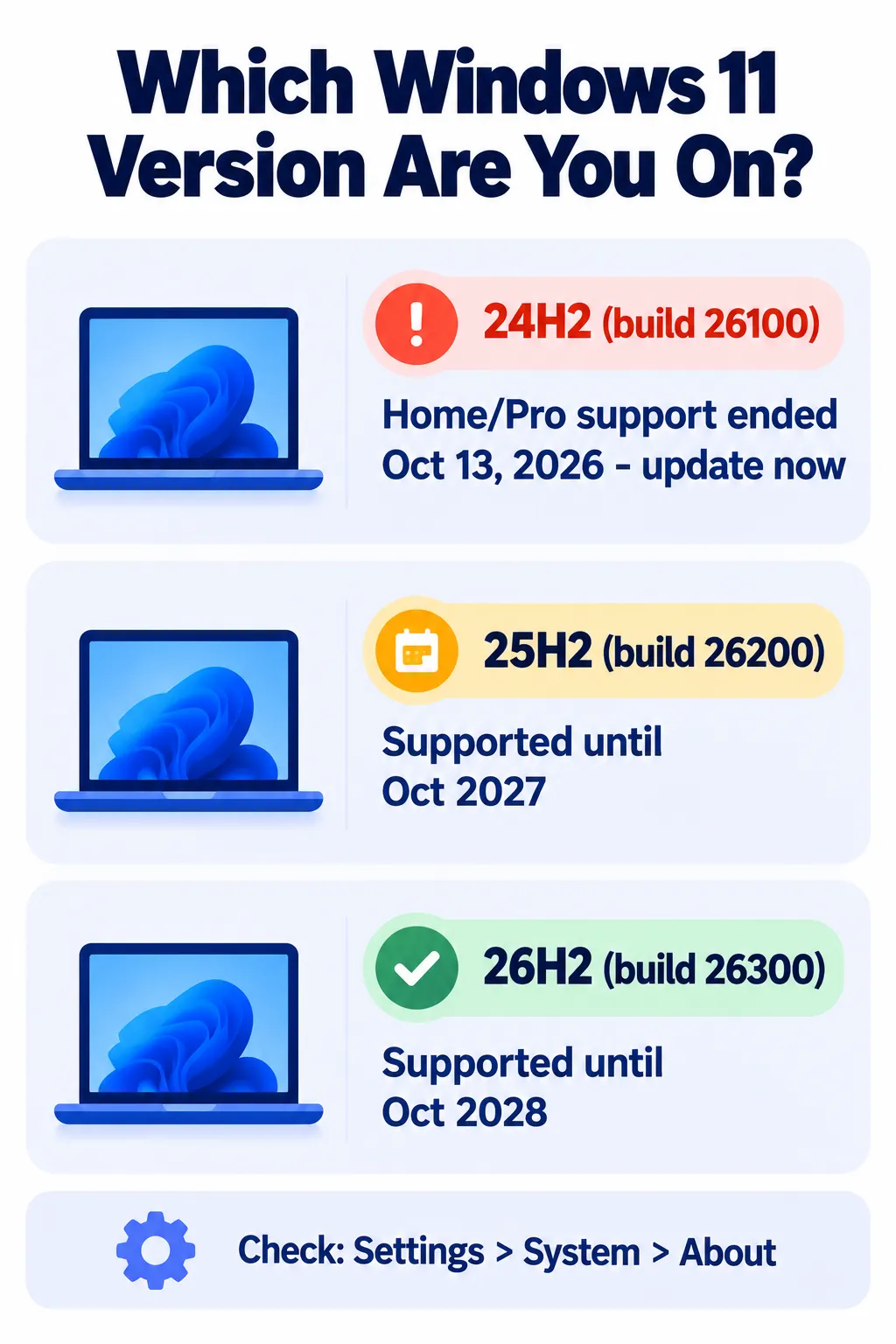
How to Check Your Windows 11 Version
- Open Settings > System > About, and look under “Windows specifications.” Or press Windows + R, type
winverand press Enter. - Check the version or build number:
- Build 26100 = 24H2
- Build 26200 = 25H2
- Build 26300 = 26H2
How to Install Windows 11 26H2
- Back up your important files first, just in case.
- Open Settings > Windows Update.
- Turn on “Get the latest updates as soon as they’re available.”
- Click Check for updates. Install any pending updates first, since 26H2 needs the September 22, 2026 update (or newer).
- When “Windows 11, version 26H2” appears, click Download & install, then restart.
Don’t see it yet? Microsoft rolls it out in stages and holds it back on some PCs with known compatibility problems. Check again in a few days. Advanced users can also use the Windows 11 Installation Assistant or ISO file from Microsoft’s website.
The October 2026 Security Update (KB5127648)
Separate from 26H2, Microsoft’s October 13 “Patch Tuesday” update fixed more than 1,400 security vulnerabilities, a record, including three zero-day flaws. Install it even if you’re not ready for 26H2. It also brings:
- Automatic PDF previews in File Explorer.
- The option to remap the Copilot key.
- New Emoji 17.0.
- Fixes for File Explorer crashes, mouse stutter in games, printing and fingerprint sign-in.
Note: Vulnerability counts and update details come from Microsoft and security researchers and have not been independently verified by Next DigiTech. Your experience may differ.
Known issues: Some older USB audio devices may show an error or play no sound, and Remote Desktop can fail in some setups. If you rely on these, check Microsoft’s release health page before updating. Not sure when to install new updates? Read should you update right away?
PCs That Can’t Get 26H2
A small number of new PCs with Snapdragon X2 or NVIDIA RTX Spark chips ship with a special version called 26H1. These can’t move to 26H2 and will get a future update (expected to be 27H2) instead. They still receive monthly security updates.
Still on Windows 10?
Windows 10 can’t get 26H2. If your PC can’t upgrade to Windows 11, the free Extended Security Updates program now runs until October 12, 2027. Here’s what the Windows 10 extension means for you.
Frequently Asked Questions
Is Windows 11 26H2 free?
Yes. It’s a free update through Windows Update for PCs on Windows 11 24H2 or 25H2.
How long does the 26H2 update take?
Usually just a few minutes and one restart, because most of the code is already on your PC.
What happens if I stay on 24H2?
Home and Pro editions no longer get security fixes, so your PC becomes more vulnerable over time. Update to 25H2 or 26H2.
Does 26H2 delete my files?
No, it keeps your files and apps. Backing up first is still a smart habit.
Will 26H2 slow down my PC?
It shouldn’t. If your PC feels slow, try these quick fixes for a slow laptop.
The Bottom Line
Windows 11 26H2 is a quick, low-risk update with useful Start menu, taskbar and search improvements. More importantly, if you’re on 24H2 Home or Pro, updating is the only way to keep getting security fixes. Check your version today, back up your files, and install it from Windows Update.
Related Guides
- Windows 10 Security Updates Now Run Until October 2027: What You Need to Know
- Should You Update Right Away? A Simple Guide to New Software Releases
- How to Speed Up a Slow Laptop in 10 Minutes (Windows and Mac)
- How to Clear Cache on iPhone, Android, Chrome and Safari
Explore more in our Software Updates hub.
Disclaimer: This article is for general information only and is based on details available at the time of writing. Prices, plans, features, release dates, policies and availability can change at any time and may vary by country. Please verify the latest information on the official website of the company or product mentioned before making any decision or purchase. Next DigiTech is an independent website and is not affiliated with or endorsed by the companies mentioned; all trademarks belong to their respective owners. We are not responsible for any loss or decisions made based on this content.

