
Microsoft’s October 2026 Patch Tuesday, released on October 13, was enormous. Security press describes it as the biggest monthly batch of fixes Microsoft has ever shipped, with more than 1,400 vulnerabilities addressed, and it includes a flaw that attackers were already using. The headline number sounds scary, but the practical advice for most home users is simple: install your Windows updates and restart. This guide explains what was fixed, why the numbers differ between reports, and how to check and install updates safely.
Quick Summary
- Reports put the October 2026 total at roughly 1,411 to 1,413 fixed flaws, a record. The exact number differs by outlet because of how they count (explained below).
- One zero-day was reported as actively exploited: CVE-2026-96951, a Windows Shell flaw that bypasses Mark of the Web warnings.
- Other zero-days were publicly disclosed but not reported as exploited: one in the .NET Framework and, according to some outlets, one in a MessagePack library for C#.
- For most people, the action is the same as every month: run Windows Update, install, restart, then confirm the update appears in your history.
| Item | What reports say |
|---|---|
| Total flaws fixed | About 1,411 (BleepingComputer) to 1,413 (Dark Reading, SOCRadar) |
| Actively exploited zero-day | CVE-2026-96951, Windows Shell, Mark of the Web bypass |
| Publicly disclosed zero-days | CVE-2026-108398 (.NET Framework) and, per some outlets, CVE-2026-92707 (MessagePack-CSharp) |
| Windows 11 updates named in reports | KB5127648 and KB5126653 |
Note: These details come from the company’s own announcements and have not been independently verified by Next DigiTech.
Why the Numbers Do Not Match
If you have seen 1,411 in one headline and 1,413 in another, neither is necessarily wrong. Here is what we found:
- BleepingComputer reports 1,411 flaws and says its count only includes vulnerabilities Microsoft released on Patch Tuesday itself, not 348 flaws fixed earlier in the month (such as some cloud and Exchange-related issues).
- Dark Reading and SOCRadar report 1,413 CVEs.
- At least one other outlet’s headline used a lower figure of 1,407, which shows how counting methods differ.
- The category breakdown in one report adds up to slightly less than its own total, and the report does not explain the gap.
The same goes for severity. Reports give 70 Critical flaws (BleepingComputer), “over 70” (SOCRadar) and 80 (Dark Reading). Zero-day counts also vary: BleepingComputer and SOCRadar list three, while Dark Reading lists two. We could not confirm which is definitive, and Microsoft’s own Security Update Guide is the place to check. The takeaway is consistent across every source: it was a record month, one flaw was exploited, and updating is the right move.
Note: Release dates and rollout timing can change. Please confirm the latest details on the official website or help center.
The Zero-Days Explained
CVE-2026-96951: Windows Shell, actively exploited
This is a security feature bypass rated 8.8 on the CVSS scale. It lets attackers get around Mark of the Web, the tag Windows puts on files downloaded from the internet. That tag is what triggers warnings in SmartScreen, Office Protected View and macro blocking, so bypassing it can make a risky file look safer than it is. Reports do not give details of who is exploiting it or how widely. Dark Reading says AI helped uncover the flaw.
CVE-2026-108398: .NET Framework, publicly disclosed
This flaw can allow bypassing Windows Defender Application Control (WDAC). It needs local access with a low-privilege account, and Microsoft reportedly rates exploitation as less likely. It matters most to businesses that use WDAC.
CVE-2026-92707: MessagePack-CSharp, publicly disclosed
A denial-of-service flaw rated Moderate, listed as a zero-day by BleepingComputer and SOCRadar. It is a developer-library issue, so most home users will not notice it.
Note: These details come from the company’s own announcements and have not been independently verified by Next DigiTech.
Why So Many Fixes This Month?
Reports tie the volume partly to AI-driven bug hunting. Dark Reading quotes Dustin Childs of the Zero Day Initiative (ZDI) saying AI speeds up the search for flaws for both defenders and attackers, but does not create the bugs. Another analyst quoted there argues raw CVE counts are not very meaningful on their own: it is more useful to ask which flaws are actually being exploited. Microsoft also published experimental “risk cohorts” that group fixes by area, such as filesystems or Office documents, but it says the groups do not rank how dangerous each flaw is.
Other high-severity items named in coverage include an Outlook Reading Pane remote code execution flaw (CVE-2026-70242, CVSS 9.8) and a QUIC remote code execution flaw (CVE-2026-105016, CVSS 9.8). Both are described as needing no user action or authentication in some scenarios, which is another reason to patch promptly.
Lifecycle Notes You Should Not Miss
BleepingComputer, quoting Microsoft, says October 2026 is the last security update for Windows 11 version 24H2 Home and Pro, and for Windows 10 Enterprise LTSB 2016. It also says Windows 11 23H2 Enterprise, Education and IoT Enterprise stop receiving security updates starting next month. If you are on 24H2, see our guide to Windows 11 26H2 and why moving up matters.
Note: Features and policies may vary by plan, region and app version, and can change at any time. Check the official help center for the latest information.
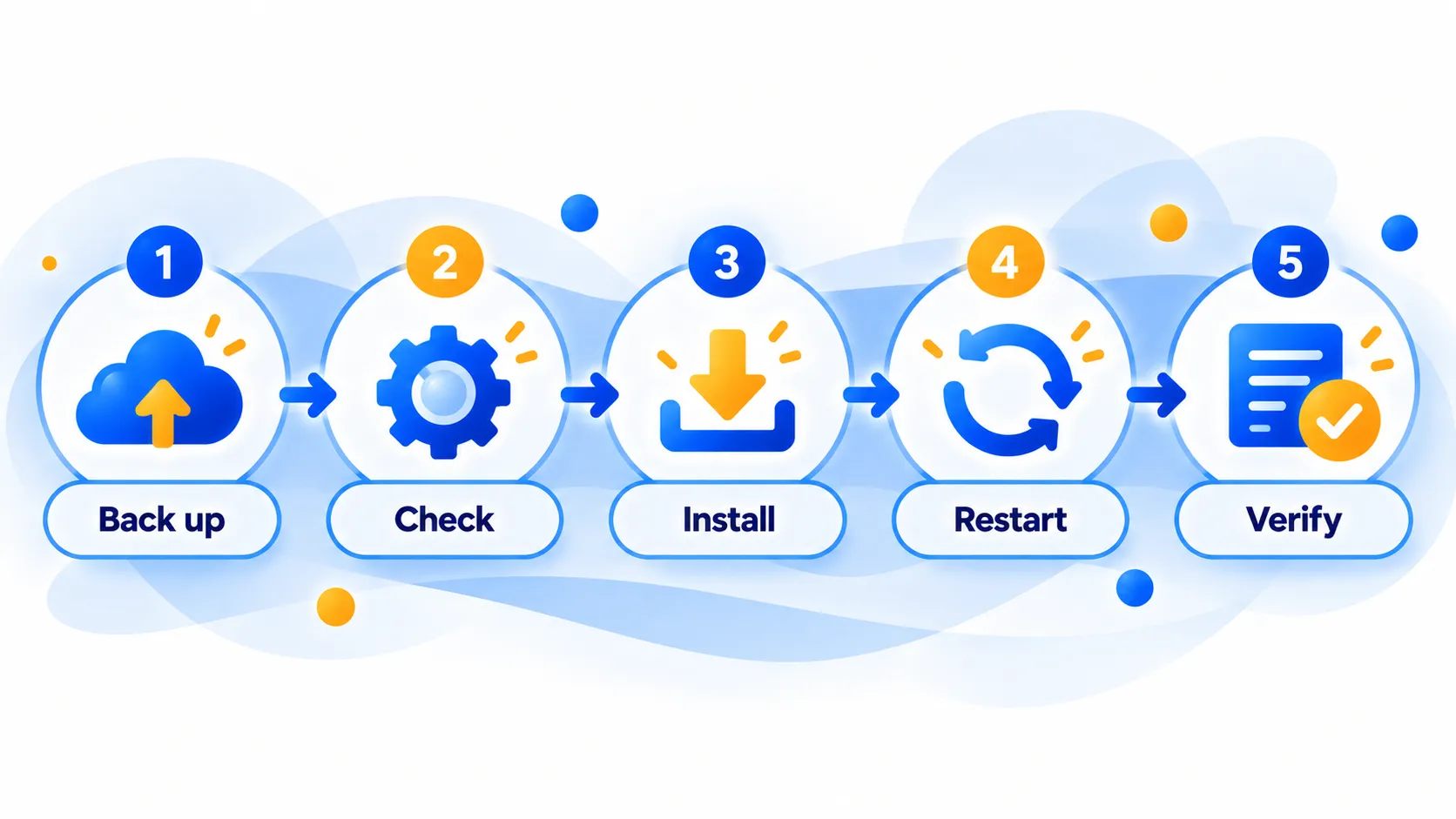
How to Check and Install Windows Updates Safely
Step by step on Windows 11
- Back up first. Copy important files to an external drive or cloud storage. Updates rarely cause data loss, but a backup removes the worry.
- Open Settings. Press the Windows key, type Settings, and open it, then choose Windows Update.
- Select Check for updates. Windows will list available updates. October’s cumulative updates were reported as KB5127648 and KB5126653 for Windows 11, though which one you get depends on your version.
- Install and restart. Save your work, choose Download and install or Restart now, and let the PC finish. Do not switch it off midway.
- Verify. Go to Windows Update, then Update history, and confirm the October 2026 update shows as Successfully installed. Our guide to checking your Windows version shows how to confirm your build number.
Safety tips
- Only use Windows Update. Be wary of emails, pop-ups or websites claiming you need to download an urgent patch. Real updates come through Settings.
- Keep the PC plugged in and on a trusted network. Our public Wi-Fi guide explains why.
- Do not ignore restart prompts. Many fixes only take effect after a restart.
- If an update fails, run the Windows Update troubleshooter, free up disk space and try again before searching for fixes elsewhere.
- Be extra careful with downloaded files this month. Since the exploited flaw weakens download warnings, avoid opening files from unknown senders even if Windows shows no warning.
Not sure whether to update straight away? Our guide on whether you should update right away covers the trade-offs, though for security updates delaying generally leaves you exposed longer.
Frequently Asked Questions
How many flaws did October 2026 Patch Tuesday fix?
Reports say about 1,411 to 1,413, a record. The difference comes from how outlets count items released earlier in the month.
Is my PC in danger if I have not updated yet?
One of the flaws was reported as actively exploited, so it is best to update soon. Most home users are not individually targeted, but installing the update closes the known hole.
How many zero-days were there?
BleepingComputer and SOCRadar list three zero-days, with one actively exploited. Dark Reading lists two. The exploited one is CVE-2026-96951 in Windows Shell.
Do I need to do anything if automatic updates are on?
Usually not, but open Windows Update and check, because updates can be paused or delayed. Restart when prompted.
Which Windows versions stop getting updates?
BleepingComputer, quoting Microsoft, says October 2026 is the final update for Windows 11 24H2 Home and Pro. Check Microsoft’s lifecycle page for your edition.
The Bottom Line
The record number grabs attention, but what matters is that updates are available now and one flaw was already being exploited. Run Windows Update, restart, and confirm in Update history. If your version is reaching the end of updates, plan your move to a supported release.
Related Guides
- Windows 11 26H2 Is Here: What’s New and Why 24H2 Users Should Update Now
- Should You Update Right Away? A Simple Guide to New Software Releases
- How to Check Which Version of Windows, macOS, iOS or Android You Have
- Is Public Wi-Fi Safe? 8 Rules for Cafes, Airports and Hotels
Explore more in our Software Updates hub.
Disclaimer: This article is for general information only and is based on details available at the time of writing. Prices, plans, features, release dates, policies and availability can change at any time and may vary by country. Please verify the latest information on the official website of the company or product mentioned before making any decision or purchase. This is not medical, financial, legal or security advice; consult a qualified professional for your situation. Next DigiTech is an independent website and is not affiliated with or endorsed by the companies mentioned; all trademarks belong to their respective owners. We are not responsible for any loss or decisions made based on this content.

