

Fathom is a free AI note-taker for online meetings. It records your Zoom, Google Meet and Microsoft Teams calls, writes a transcript, and creates a summary right after the meeting ends. Its free plan is one of the most generous in the category, which is why it’s popular with freelancers, salespeople and small teams.
Here’s how Fathom works, what’s free, and when it’s worth upgrading.
Quick Verdict
- Best for: Anyone who has lots of online meetings and wants free, unlimited recordings and transcripts.
- Skip it if: You mainly need to record in-person meetings. Fathom is built for online calls.
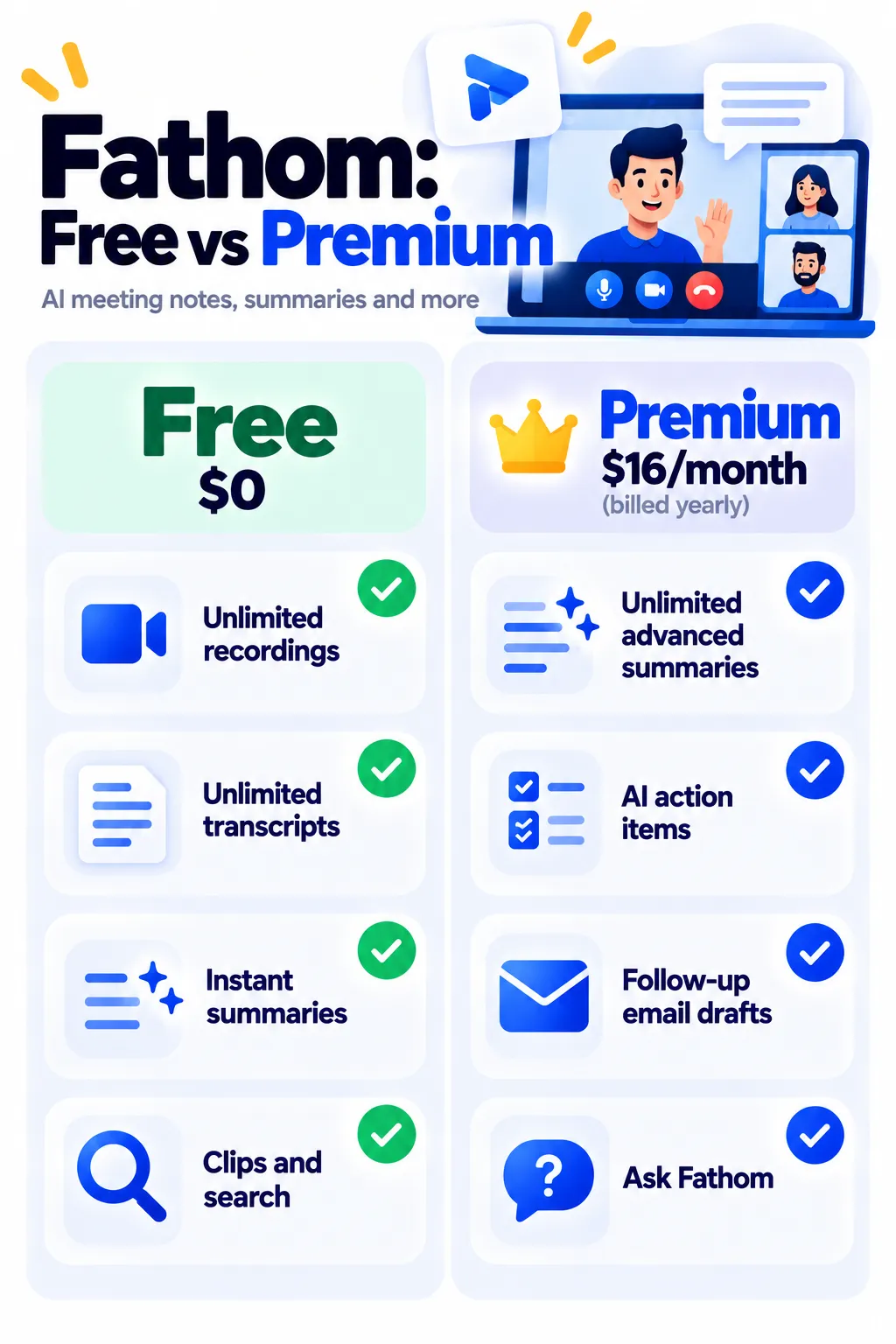
- Is the free plan enough? For many people, yes. Upgrade if you want unlimited advanced AI summaries and action items.
What Is Fathom?
Fathom is an AI meeting assistant that joins your online calls as a participant, records them, and creates notes you can search and share. After each meeting, you get a summary, highlights and a full transcript, often within seconds.
Main Features
- Unlimited recordings and transcripts on the free plan.
- Instant AI summaries after each call.
- Clips and highlights: Save and share key moments.
- Search across calls to find what was said.
- Action items and follow-up emails (advanced, mainly on Premium).
- Ask Fathom: Ask questions about your meetings (Premium).
- Integrations with CRMs and tools like Slack (higher plans).
How to Use Fathom (Step by Step)
- Go to fathom.video and sign up free with Google or Microsoft.
- Connect your calendar and choose your meeting platform (Zoom, Google Meet or Teams).
- Decide whether Fathom joins all meetings, only external meetings, or only when you choose.
- Join your meeting as usual. Fathom’s assistant joins and records.
- After the call, open the summary and highlights in your Fathom dashboard or email.
- Share notes or clips with your team or clients.
Fathom Pricing (2026)
US prices as of October 2026:
| Plan | Price | What you get |
|---|---|---|
| Free | $0 | Unlimited recordings, transcripts and storage, instant summaries, with limited advanced AI each month |
| Premium | $16/month yearly ($20 monthly) | Unlimited advanced summaries, AI action items, follow-up emails, Ask Fathom |
| Team | $15/user/month yearly ($19 monthly), 2-seat minimum | Shared team features |
| Business | $25/user/month yearly ($34 monthly) | CRM sync, admin controls and more |
Free-plan AI limits can change, so check Fathom’s pricing page for the latest details.
Recording Etiquette and Privacy
- Always tell participants that the meeting is being recorded. Some places require everyone’s consent.
- Customize when Fathom joins, so it doesn’t record private or sensitive calls by accident.
- Follow client and company rules about recording and storing calls.
- Review AI summaries before sending them to clients.
Fathom vs Otter.ai
Fathom offers unlimited free recordings of online meetings. Otter.ai limits free minutes but also records in-person conversations through its phone app. Compare more tools in best AI meeting note takers, and small business owners can find more time-savers in AI tools for small business.
Frequently Asked Questions
Is Fathom really free?
Yes. The free plan includes unlimited recordings, transcripts and storage. Some advanced AI features are limited each month unless you upgrade.
Does Fathom work with Google Meet and Teams?
Yes. Fathom works with Zoom, Google Meet and Microsoft Teams.
Will people see Fathom in my meeting?
Yes. Fathom joins as a visible participant, so others know the meeting is being recorded.
Can Fathom record in-person meetings?
Fathom is designed for online video calls. For in-person recording, a tool with a mobile recorder like Otter is a better fit.
Why didn’t Fathom join my meeting?
Check that your calendar is connected, the meeting has a video link, and your auto-join settings include that type of meeting.
The Bottom Line
Fathom’s free plan gives you unlimited meeting recordings and transcripts, which is hard to beat. Start free, tell participants you’re recording, and upgrade to Premium only if you want unlimited advanced summaries and action items. Explore more tools in our AI tools directory.
Related Guides
- Fireflies.ai Review 2026: AI Meeting Notes, AskFred, Pricing and Is It Worth It?
- What Is Notion AI? Features, Pricing and Is It Worth It? (2026)
- How to Use AI to Write Emails in Gmail (Step by Step)
- 10 Small Business Tasks You Can Automate Today (With the Best Tools)
Explore more in our AI Productivity Tools hub.
Disclaimer: This article is for general information only and is based on details available at the time of writing. Prices, plans, features, release dates, policies and availability can change at any time and may vary by country. Please verify the latest information on the official website of the company or product mentioned before making any decision or purchase. Next DigiTech is an independent website and is not affiliated with or endorsed by the companies mentioned; all trademarks belong to their respective owners. We are not responsible for any loss or decisions made based on this content.

