
Zapier, Make and n8n are the three most popular tools for automating work without writing code. They all connect your apps and run tasks automatically, but they differ a lot in ease of use, pricing and power. Picking the wrong one can mean overpaying or getting stuck.
Here’s a clear, honest comparison to help you choose in 2026.
Quick Answer
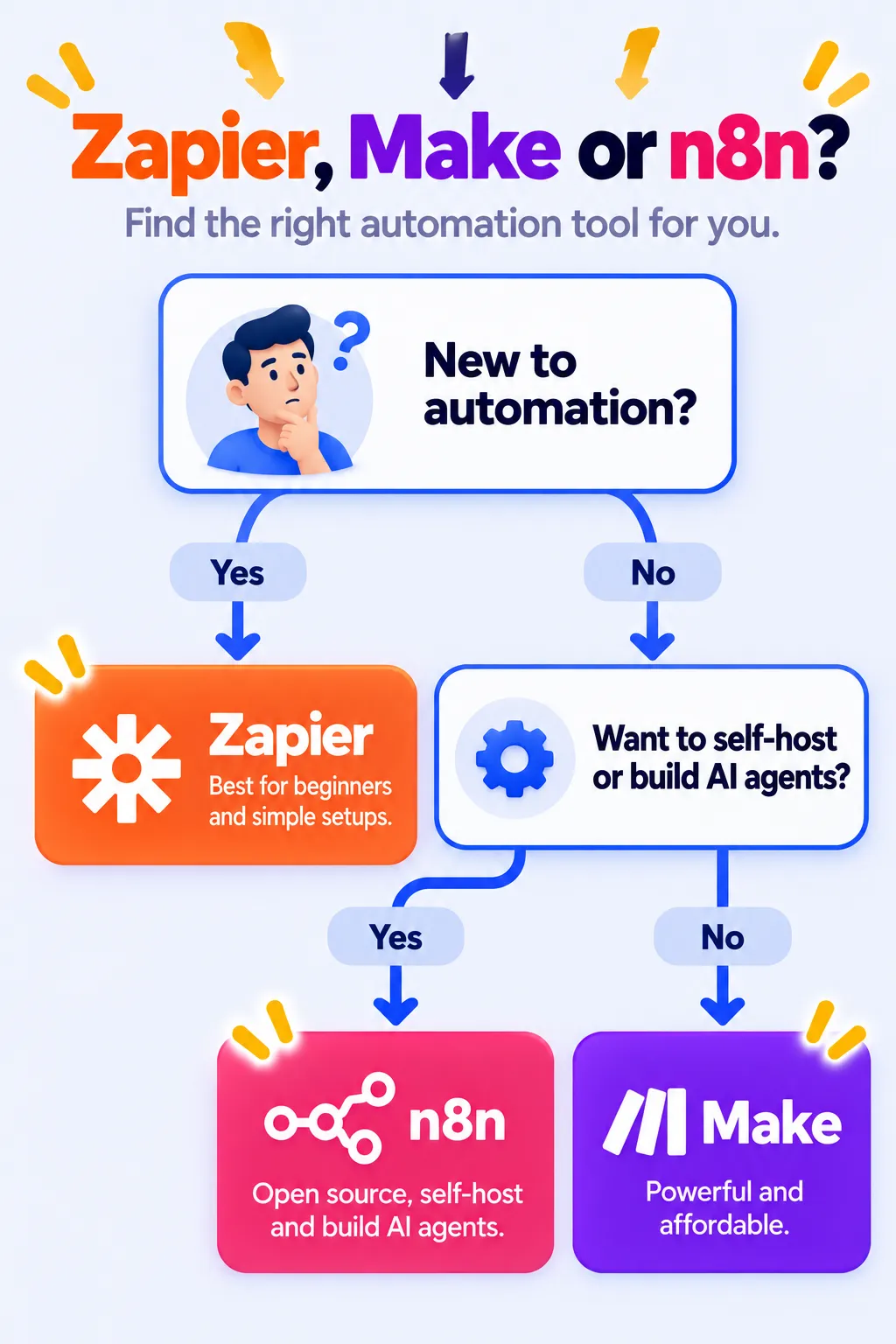
- Choose Zapier if you’re a beginner and want the easiest setup with the most app integrations.
- Choose Make if you want powerful, visual workflows at a much lower price.
- Choose n8n if you’re comfortable with some technical setup and want AI agents, self-hosting or the best value at high volume.
Side-by-Side Comparison
| Zapier | Make | n8n | |
|---|---|---|---|
| Ease of use | Easiest | Medium | Hardest |
| Builder style | Step-by-step list | Visual canvas | Visual node canvas |
| App integrations | Thousands (largest) | 3,000+ | Hundreds of built-in nodes plus any API |
| Free plan | 100 tasks/month, two-step Zaps | 1,000 credits/month, 2 scenarios | Free if you self-host |
| Entry paid price | From $19.99/month yearly | About $9/month yearly | About €20/month yearly (cloud) |
| How you’re billed | Per task (each action step) | Per credit (each module run) | Per execution (whole workflow run) |
| Self-hosting | No | No | Yes |
| Best for | Beginners, small businesses | Freelancers, agencies, complex flows | Tech users, AI agents, high volume |
Prices are US/EU list prices as of October 2026 and change often.
Note: Prices are based on official announcements at the time of writing and may vary by country, retailer, taxes and promotions. Always check the latest pricing on the official website before buying.
1. Ease of Use
Zapier is the most beginner-friendly. You build Zaps as a simple list of steps, and Copilot can create them from a plain-English description. Most people build their first automation in minutes.
Make uses a visual canvas where you connect circles. It takes a little longer to learn, but complex branching is easier to understand once you see it laid out.
n8n also uses a visual canvas but is aimed at more technical users. You’ll get the most from it if you understand APIs, data formats and (for self-hosting) servers.
2. Pricing: Where the Real Difference Is
The three tools count usage differently, and this matters more than the headline price:
- Zapier counts every action step as a task. A Zap with 4 actions that runs 500 times uses 2,000 tasks.
- Make counts each module run as a credit. The same workflow uses roughly the same number of credits as Zapier tasks, but Make’s credits are much cheaper.
- n8n Cloud counts one execution per full workflow run, no matter how many steps. That same workflow uses only 500 executions.
Example: For a simple two-step workflow that runs 300 times a month, all three are affordable. For a ten-step AI workflow that runs thousands of times, Make or n8n can cost a fraction of Zapier.
3. Integrations
Zapier connects with the most apps, which makes it the safest choice if you use niche or industry-specific tools. Make covers the most popular apps and lets you call any app’s API. n8n has fewer pre-built integrations but lets you connect to almost anything through HTTP requests and code.
4. AI Features
- Zapier: AI steps, Copilot to build Zaps, plus Zapier Agents (billed separately).
- Make: AI modules and AI agents inside scenarios.
- n8n: The strongest for building custom AI agents, with memory, tools and support for many AI models. It’s a favorite among developers building AI workflows.
New to AI agents? Read what are AI agents?
5. Privacy and Data Control
Zapier and Make run only in the cloud. n8n can run on your own server, which keeps data under your control. That matters for businesses handling sensitive customer or health information, but it also means you’re responsible for security and updates.
Note: Features and policies may vary by plan, region and app version, and can change at any time. Check the official help center for the latest information.
Which Should You Choose?
Choose Zapier if:
- You’re new to automation and want quick wins.
- You use many different or niche business apps.
- Your workflows are simple and don’t run thousands of times.
Choose Make if:
- You want advanced logic, like branches and loops, without a big bill.
- You’re a freelancer or agency building automations for clients.
- You like seeing your whole workflow visually.
Choose n8n if:
- You want to build AI agents or complex, high-volume workflows.
- You need self-hosting for data control or cost savings.
- You or someone on your team is comfortable with technical setup.
What About Power Automate and IFTTT?
If your work runs on Microsoft 365, Power Automate may already be included and also automates Windows desktop apps. For personal routines and smart homes, IFTTT is the simplest and cheapest option.
Frequently Asked Questions
Which is cheapest: Zapier, Make or n8n?
Self-hosted n8n is free software, so you only pay for a server. Among cloud plans, Make is usually cheapest for most workflows. Zapier is usually the most expensive at higher volumes.
Which is best for beginners?
Zapier. It has the simplest builder and the most templates and integrations.
Can I switch tools later?
Yes, but you’ll need to rebuild your workflows, since they can’t be transferred directly. Starting with a few test workflows on each tool’s free plan or trial helps you choose before committing.
Which is best for AI agents?
n8n is the most flexible for custom AI agents. Zapier and Make also offer AI agents that are easier to set up but less customizable.
Do I need coding skills?
Not for Zapier or Make. n8n can also be used without code, but some technical knowledge helps, especially for self-hosting.
The Bottom Line
There’s no single winner. Zapier is the easiest, Make offers the best balance of power and price, and n8n gives the most control and value for technical users. Start with the free plan or trial of the tool that fits your skill level, automate one real task, and grow from there. For more time-saving ideas, see AI tools for small business owners, or explore our AI tools directory.
Related Guides
- 10 Small Business Tasks You Can Automate Today (With the Best Tools)
- Google Apps Script: 25 Things You Can Automate for Free (Beginner’s Guide 2026)
- WhatsApp Automation for Business: Best Tools, Free Features and 2026 Pricing
- Website Chat Automation: How to Add an AI Chatbot to Your Website (2026 Guide)
Explore more in our Automation and Chatbot Tools hub.
Disclaimer: This article is for general information only and is based on details available at the time of writing. Prices, plans, features, release dates, policies and availability can change at any time and may vary by country. Please verify the latest information on the official website of the company or product mentioned before making any decision or purchase. Next DigiTech is an independent website and is not affiliated with or endorsed by the companies mentioned; all trademarks belong to their respective owners. We are not responsible for any loss or decisions made based on this content.

