

WhatsApp is where more than 2 billion people chat every day, and for many customers it’s the easiest way to reach a business. But answering every “Are you open today?” or “Where’s my order?” by hand quickly takes over your day. WhatsApp automation lets you reply instantly, send order updates, book appointments and follow up with leads automatically.
This guide covers the free automation already built into WhatsApp Business, the best automation tools in 2026, the new pricing rules, and the mistakes that can get your number banned.
Quick Answer
- Just starting out? Use the free WhatsApp Business app with greeting messages, away messages and quick replies.
- Need chatbots, broadcasts or a team inbox? Use an official platform built on the WhatsApp Business Platform (API), like WATI, Respond.io, ManyChat or Twilio.
- Avoid unofficial “bulk sender” tools and browser extensions that automate WhatsApp Web. They break WhatsApp’s rules and can get your number banned.
Option 1: Free Automation in the WhatsApp Business App
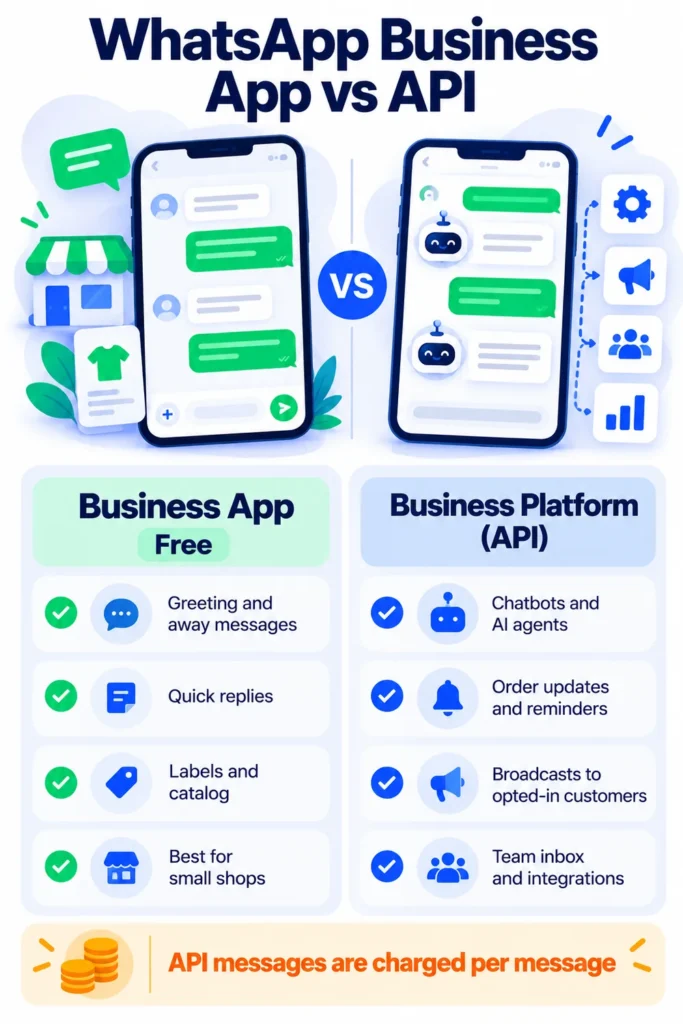
The free WhatsApp Business app (iPhone and Android) includes simple automation that works for many small businesses. You’ll find these under Settings > Business tools:
- Greeting message: Automatically welcomes customers who message you for the first time, or after 14 days of no activity.
- Away message: Replies automatically outside business hours or when you’re unavailable.
- Quick replies: Save answers to common questions and send them by typing a shortcut, like
/hoursor/price. - Labels: Organize chats, like “New lead,” “Paid” or “Follow up.”
- Catalog: Show products and prices so customers can browse without asking.
- Short link and QR code: Let customers start a chat with one tap from your website or flyers.
Limits: The app is designed for a small number of users on a few devices, has no real chatbot or integrations, and doesn’t support large automated broadcasts. Once you outgrow it, move to the API.
Option 2: The WhatsApp Business Platform (API)
The WhatsApp Business Platform, often called the WhatsApp Business API, is Meta’s official system for larger-scale automation. You usually access it through a Business Solution Provider (BSP), which gives you an easy dashboard. It unlocks:
- Chatbots that answer FAQs, qualify leads and book appointments 24/7.
- Template messages for order confirmations, shipping updates, reminders and promotions.
- Broadcasts to customers who have opted in.
- Shared team inbox so several people can reply from one number.
- Integrations with Shopify, CRMs, Google Sheets, payment tools and automation apps.
Key rules to understand
- Opt-in is required: You can only message people who have agreed to hear from you on WhatsApp.
- 24-hour customer service window: When a customer messages you, you can reply freely for 24 hours. After that, you must use a pre-approved template message.
- Templates need approval: Meta reviews templates before you can send them.
WhatsApp API Pricing in 2026 (What Changed)
WhatsApp pricing changed twice recently, so many older guides are out of date:
- Since July 1, 2025: Meta charges per delivered template message, based on the message type and the customer’s country, instead of per conversation.
- From October 1, 2026: According to Meta’s latest pricing update, regular service replies inside the 24-hour window are no longer free without limit. Each business phone number gets 1,000 free service messages a month, and after that they’re charged at the local utility rate.
Example Meta rates for US and Canadian customers in 2026:
| Message type | Used for | Approximate Meta rate (US) |
|---|---|---|
| Marketing | Promotions, offers, newsletters | About $0.025 per message |
| Utility | Order updates, reminders, confirmations | About $0.003 to $0.004 per message |
| Authentication | One-time passcodes | Low per-message rate |
| Service | Replies to customer messages | 1,000 free per number each month, then the utility rate |
Rates differ by country, and your platform provider may add its own fee or markup on top of Meta’s charges. Conversations started from Click-to-WhatsApp ads have a free messaging window. Always check Meta’s official pricing page and your provider’s pricing before budgeting.
Best WhatsApp Automation Tools in 2026
All of these use the official WhatsApp Business Platform. Starting prices are approximate as of 2026 and don’t include Meta’s message fees.
1. WATI — Best all-round choice for small businesses
A WhatsApp-focused platform with a no-code chatbot builder, broadcasts, shared inbox and Shopify tools. Plans start at roughly $49 to $59 a month, with AI agents as an add-on. Great if WhatsApp is your main customer channel. Read our full WATI review.
2. Respond.io — Best for teams using many channels
Manages WhatsApp, Instagram, Messenger, email and more in one inbox, with AI agents and advanced routing. Plans start around $79 a month, and Respond.io says it doesn’t mark up Meta’s fees. Best for growing sales and support teams. Read our full Respond.io review.
3. ManyChat — Best for marketing and social-first brands
Popular for Instagram automation, with WhatsApp flows for lead capture, campaigns and sales. Has a free plan, with paid plans from about $15 a month and an AI add-on. Easy if you already use ManyChat for Instagram. Read our full ManyChat for WhatsApp review.
4. Twilio — Best for developers
Gives direct API access for building custom WhatsApp automations. Pay-as-you-go pricing (Twilio’s own small per-message fee plus Meta’s fees), but you’ll need a developer.
5. AiSensy and Interakt — Budget options popular in India
Affordable broadcast and chatbot platforms widely used by Indian businesses, with features like WhatsApp payments. Check whether they support your country and currency if you’re in the US, UK or Australia. See our AiSensy review, Interakt review and Gallabox review.
6. Zapier, Make and n8n — Connect WhatsApp to your other apps
Automation tools can connect your WhatsApp platform to Google Sheets, CRMs and online stores, for example sending a WhatsApp order update when a new Shopify order arrives. Learn more in What Is Zapier?, What Is Make? and What Is n8n?
10 WhatsApp Automations That Save Time
- Instant FAQ replies: Opening hours, prices, location and delivery times.
- Order confirmations and shipping updates from your online store.
- Appointment booking and reminders for salons, clinics and consultants.
- Lead qualification: Ask a few questions, then pass hot leads to a salesperson.
- Abandoned cart reminders for customers who opted in.
- Payment reminders for invoices or subscriptions.
- Feedback requests after a purchase or visit.
- Back-in-stock alerts for interested customers.
- Event or class reminders the day before.
- Human handoff: Let customers type “agent” to reach a real person anytime.
AI Chatbots on WhatsApp: The 2026 Rule Change
Businesses can still use AI chatbots on WhatsApp to help their own customers, such as answering product questions or booking appointments. But since January 15, 2026, Meta’s WhatsApp Business terms restrict general-purpose AI assistants whose main product is the AI itself. That’s why some standalone AI assistants had to shut down their WhatsApp numbers. If you use AI, keep it focused on your business and make it easy to reach a human.
New to AI agents? Read what are AI agents? If you use WhatsApp personally and want to limit Meta AI in your chats, see how to turn off Meta AI.
Note: Features and policies may vary by plan, region and app version, and can change at any time. Check the official help center for the latest information.
Mistakes That Can Get Your Number Banned
- Using unofficial bulk senders or WhatsApp Web automation extensions. They violate WhatsApp’s terms and can lead to a permanent ban.
- Messaging people who didn’t opt in, such as purchased contact lists.
- Sending too many promotions. High block and report rates lower your quality rating and can restrict your account.
- Not offering a way to opt out. Always let customers stop messages easily.
- Hiding the human. Customers get frustrated if they can’t reach a person.
How to Get Started (Step by Step)
- Start with the free WhatsApp Business app and set up greeting messages, away messages and quick replies.
- List your most common questions and tasks. These are what you’ll automate first.
- When you outgrow the app, choose an official platform like WATI, Respond.io or ManyChat and connect your number to the WhatsApp Business Platform.
- Build one simple flow, like an FAQ bot or order updates, and test it with friends.
- Collect opt-ins through your website, checkout and Click-to-WhatsApp ads.
- Track costs and results each month, and adjust your message types to control spending.
Frequently Asked Questions
Can I automate WhatsApp for free?
Yes, basic automation is free in the WhatsApp Business app: greeting messages, away messages and quick replies. Chatbots and broadcasts need the WhatsApp Business Platform, which charges per message.
Is WhatsApp Business API free?
There’s no license fee, but Meta charges per delivered template message, and from October 1, 2026, service replies beyond 1,000 a month per number are also charged. Your provider may add a monthly plan fee.
Can I use a chatbot on WhatsApp?
Yes, through official platforms built on the WhatsApp Business Platform. AI chatbots must support your business’s customers, not act as a general-purpose AI assistant.
Can I send bulk messages on WhatsApp?
Only to customers who opted in, using approved template messages through the official platform. Unofficial bulk-sending tools risk getting your number banned.
Which WhatsApp automation tool is best for small businesses?
Start with the free WhatsApp Business app. When you need more, WATI is a strong all-round choice, ManyChat suits marketing, and Respond.io suits teams managing several channels.
The Bottom Line
WhatsApp automation can save hours every week and help you reply to customers instantly. Start free with the WhatsApp Business app, move to an official platform when you need chatbots and broadcasts, understand the new per-message pricing, and never use unofficial bulk tools. For more ways to save time, see AI tools for small business owners or explore our AI tools directory.
Related Guides
- Website Chat Automation: How to Add an AI Chatbot to Your Website (2026 Guide)
- 10 Small Business Tasks You Can Automate Today (With the Best Tools)
- Zapier vs Make vs n8n: Which Automation Tool Should You Use? (2026)
- Tidio Review 2026: Live Chat, Lyro AI, Real Pricing and Is It Worth It?
Explore more in our Automation and Chatbot Tools hub.
Disclaimer: This article is for general information only and is based on details available at the time of writing. Prices, plans, features, release dates, policies and availability can change at any time and may vary by country. Please verify the latest information on the official website of the company or product mentioned before making any decision or purchase. Next DigiTech is an independent website and is not affiliated with or endorsed by the companies mentioned; all trademarks belong to their respective owners. We are not responsible for any loss or decisions made based on this content.

