ManyChat is best known for Instagram automation, like sending a DM when someone comments a keyword on your post. But it also supports WhatsApp, which lets creators and brands move followers from social media into WhatsApp conversations, capture leads and run automated sales flows, all from one visual builder.
Here’s how ManyChat works for WhatsApp, what changed with its 2026 pricing, and whether it’s the right choice for you.
Quick Verdict
- Best for: Creators, coaches, D2C brands and marketers who use Instagram or Facebook to drive conversations and want to add WhatsApp.
- Not ideal if: You need a full WhatsApp support desk with many agents, or WhatsApp is your only channel. WATI or Respond.io fit better.
- Can I use WhatsApp on the free plan? No. WhatsApp starts on the Pro plan.
What Is ManyChat?
ManyChat is a no-code chat marketing platform. You build automated conversations, called flows, with a drag-and-drop builder, then connect them to channels like Instagram, Facebook Messenger, WhatsApp, TikTok, SMS and email. It’s an official partner of Meta, and its WhatsApp features run on the official WhatsApp Business Platform.
New to WhatsApp automation? Read our overview of WhatsApp automation tools for business.
What ManyChat Can Do on WhatsApp
- Automated conversation flows: Welcome messages, FAQs, product recommendations and lead capture.
- Collect contact details: Ask for names, emails or preferences and save them to custom fields.
- Move followers from Instagram to WhatsApp: Use comment and DM automations on Instagram to invite people into a WhatsApp chat.
- Broadcasts: Send approved template messages to opted-in contacts (Pro and above).
- AI features: AI steps that understand what people type, answer questions and help build flows (Pro and above on the current plans).
- Growth tools: WhatsApp links, QR codes and Click-to-WhatsApp ads.
- Integrations: Shopify, Google Sheets, HubSpot, Zapier, Make and more.
- Live chat inbox: Jump in when a human reply is needed.
ManyChat Pricing (2026)
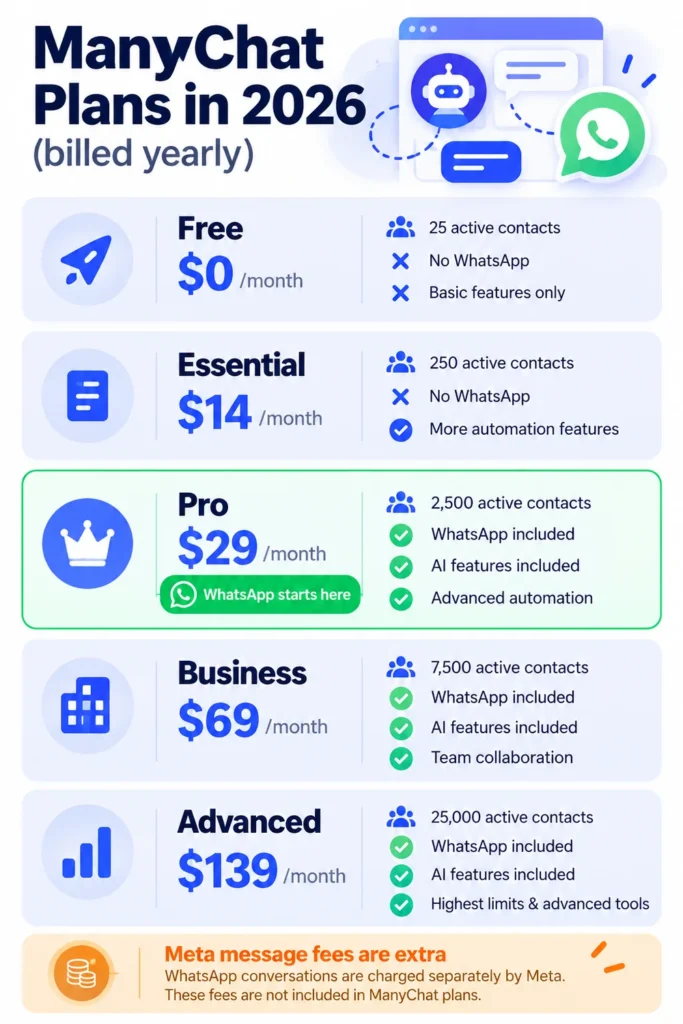
ManyChat overhauled its pricing in March 2026. Plans are now based on active contacts, meaning people you interact with each month. Prices as of October 2026:
| Plan | Billed yearly | Billed monthly | Active contacts | WhatsApp? |
|---|---|---|---|---|
| Free | $0 | $0 | 25 | No |
| Essential | $14/month | $17/month | 250 | No |
| Pro | $29/month | $39/month | 2,500 | Yes |
| Business | $69/month | $99/month | 7,500 | Yes |
| Advanced | $139/month | $199/month | 25,000 | Yes |
What to know about costs
- WhatsApp starts on Pro. Free and Essential don’t include it.
- Extra active contacts beyond your plan are charged as overage (a few cents each).
- AI: Under the new plans, ManyChat AI is included on Pro and above. Older plans used a separate AI add-on, so check which version your account is on.
- Meta message fees: WhatsApp template messages are billed by Meta through your Meta payment method. From October 1, 2026, service replies beyond 1,000 a month per number are also charged.
- Free trial: ManyChat usually offers a 14-day trial on Essential and Pro.
Check manychat.com/pricing for the latest details before upgrading.
Note: Release dates and rollout timing can change. Please confirm the latest details on the official website or help center.
How to Set Up WhatsApp in ManyChat (Step by Step)
- Create or log in to your ManyChat account and start a Pro trial or plan.
- Go to Settings > Channels and choose WhatsApp.
- Connect through Meta: Link your Meta Business account and a phone number for the WhatsApp Business Platform.
- Add a payment method in Meta for WhatsApp message fees.
- Build your first flow, for example a welcome message with buttons like “See products,” “Book a call” or “Talk to a human.”
- Add an entry point: A WhatsApp link, QR code, Instagram comment trigger or Click-to-WhatsApp ad.
- Test the flow on your own phone, then go live.
5 Popular ManyChat + WhatsApp Automations
- Comment-to-WhatsApp: Someone comments “GUIDE” on your Instagram post, gets a DM with a link, and continues on WhatsApp to receive a free guide.
- Lead qualification: Ask budget, timeline and needs, then send hot leads to your CRM or sales team.
- Product finder: Ask a few questions and recommend the right product with a buy link.
- Webinar and event reminders for people who registered and opted in.
- Abandoned cart follow-up through Shopify integration for opted-in shoppers.
Pros and Cons
Pros
- Excellent visual flow builder that’s easy to learn
- Best-in-class Instagram automation alongside WhatsApp
- Great for turning social engagement into leads
- Affordable entry point for WhatsApp on Pro
- Many integrations and templates
Cons
- Free plan is now very limited (25 active contacts)
- WhatsApp not available on Free or Essential
- Not a full support desk for large WhatsApp teams
- Costs grow as your active contacts grow
- Pricing changes in 2026 can be confusing for existing users
ManyChat vs WhatsApp-First Tools
- ManyChat: Best when Instagram or Facebook is your main traffic source and WhatsApp is part of the funnel.
- WATI: Better if WhatsApp is your main channel and you need a team inbox.
- AiSensy and Interakt: Budget-friendly for WhatsApp broadcasts and commerce, especially in India.
- Respond.io: Better for larger teams handling many channels with AI agents.
Tips to Get Results
- Offer something valuable to get people into WhatsApp, like a free guide, discount or quick consultation.
- Keep flows short with buttons rather than long text.
- Always offer a human option and an easy way to opt out.
- Clean up inactive contacts and focus on engaged audiences to control costs.
Frequently Asked Questions
Does ManyChat support WhatsApp?
Yes. ManyChat supports WhatsApp through the official WhatsApp Business Platform, starting on the Pro plan.
Is ManyChat free?
There’s a free plan, but since March 2026 it covers only 25 active contacts and doesn’t include WhatsApp.
How much does ManyChat cost for WhatsApp?
Pro costs $29 a month billed yearly ($39 monthly) for 2,500 active contacts, plus Meta’s WhatsApp message fees.
Does ManyChat include AI?
On the current plans, ManyChat AI is included on Pro and above. Older plans had a separate AI add-on.
Can I use my existing WhatsApp number?
You can connect a number to the WhatsApp Business Platform, but a number used in the regular WhatsApp app must be migrated, and it won’t work in the standard app afterward. Many businesses use a new number.
Is ManyChat better than WATI?
For Instagram-driven marketing funnels, ManyChat is often better. For a WhatsApp-focused support and sales team, WATI is usually the better fit.
The Bottom Line
ManyChat is a great choice if your customers find you on Instagram or Facebook and you want to continue the conversation on WhatsApp. Start with the Pro trial, build one simple flow, and keep an eye on active contacts and Meta fees as you grow. Explore more tools in our AI tools directory.
Related Guides
- WhatsApp Automation for Business: Best Tools, Free Features and 2026 Pricing
- Gallabox Review 2026: WhatsApp Chatbots, AI Agents, Pricing and Is It Worth It?
- Tidio Review 2026: Live Chat, Lyro AI, Real Pricing and Is It Worth It?
- 10 Small Business Tasks You Can Automate Today (With the Best Tools)
Explore more in our Automation and Chatbot Tools hub.
Disclaimer: This article is for general information only and is based on details available at the time of writing. Prices, plans, features, release dates, policies and availability can change at any time and may vary by country. Please verify the latest information on the official website of the company or product mentioned before making any decision or purchase. Next DigiTech is an independent website and is not affiliated with or endorsed by the companies mentioned; all trademarks belong to their respective owners. We are not responsible for any loss or decisions made based on this content.