
If you use the free version of ChatGPT, you may have noticed ads appearing below some answers. By default, these ads can be personalized using your conversations, memory and past chats. A recent report from 404 Media on how advertisers can target ChatGPT users has made many people look for the off switch.
Here’s how ChatGPT ads work, what data is used, and exactly how to turn off personalized ads and delete your ad data.
Who Sees Ads in ChatGPT?
- Ads appear on: Free and Go plans.
- No ads on: Plus, Pro, Business, Enterprise and Edu plans.
- No ads for: Accounts identified as under 18, and Temporary Chats.
- Where they appear: Below a ChatGPT response, clearly labeled. OpenAI is also testing labeled ads while images are being generated.
Note: Ad availability and policies may vary by plan, region and app version, and can change at any time. Check the official help center for the latest information.
OpenAI says ads don’t change ChatGPT’s answers, and ads aren’t shown next to conversations about health, mental health or politics. Political ads aren’t allowed. Wondering what else the free plan includes? Read Is ChatGPT free?
What Data Is Used for ChatGPT Ads?
| Setting | What’s used to pick ads |
|---|---|
| Always (contextual ads) | Your current conversation, general location and language |
| Personalized ads ON | The above, plus how you interact with ads, and your past chats and memory |
| Personalized ads OFF | Only the current conversation, general location and language |
According to OpenAI, advertisers don’t see your chats, history, memories, name, email, precise location or IP address. They get only overall performance data like views and clicks. The 404 Media report, however, says advertisers can target audiences using details such as email addresses and phone numbers, combined with what people discuss. If that makes you uncomfortable, the steps below limit how your data is used.
Note: These details come from the company’s own announcements and published reports, and have not been independently verified by Next DigiTech.
How to Turn Off Personalized Ads in ChatGPT
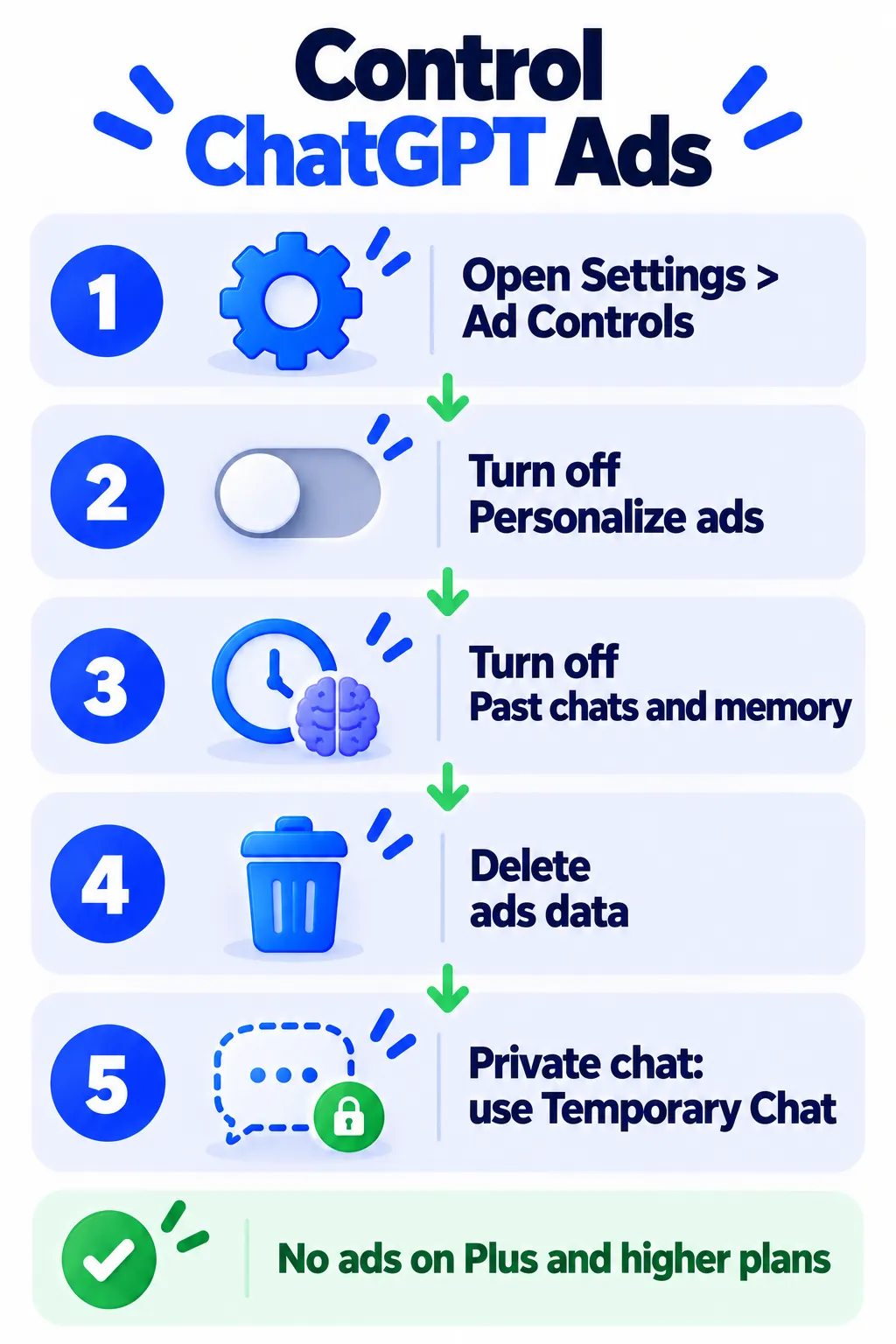
- Open ChatGPT on the web or in the app and click your profile picture.
- Go to Settings > Ad Controls.
- Turn off Personalize ads.
- Turn off Past chats and memory so your older conversations and saved memories aren’t used for ads.
- Click Delete ads data to clear your ad history and topics.
You’ll still see some ads on free plans, but they’ll be based only on the current conversation, not your history. Deleting ad data doesn’t delete your chats. OpenAI says it stops using that data right away and removes it from its servers within 30 days.
Note: Settings names, data-deletion timelines and privacy policies may vary by plan, region and app version, and can change at any time. Check the official help center for the latest information.
More Ways to Limit Ads
- Use Temporary Chat: Temporary Chats show no ads and don’t use or update memory. Great for private topics.
- Hide or report an ad: Click the three dots on any ad to hide it, report it, or see why you’re seeing it.
- Review memory: Delete anything you don’t want saved. Here’s how ChatGPT memory works and how to turn it off.
- Stop training on your chats: That’s a separate setting from ads. See how to stop AI from training on your chats.
- Upgrade: Plus and higher plans don’t show ads at all.
Is It Safe to Click ChatGPT Ads?
Ads in ChatGPT are reviewed, but treat them like any online ad. Check the website before buying, compare prices, and never enter payment details on a site you don’t recognize. With Black Friday coming, read how to spot fake deals and scam shopping sites.
Frequently Asked Questions
Does ChatGPT have ads?
Yes, on the Free and Go plans in eligible regions. Plus and higher plans are ad-free.
Can I turn off ads in ChatGPT completely?
Not on free plans. You can turn off personalization so ads use only the current chat, use Temporary Chat for an ad-free session, or upgrade to a paid plan.
Do advertisers see my ChatGPT conversations?
OpenAI says no. Advertisers only receive aggregated data like views and clicks.
Are personalized ads available in Europe?
Personalized ads aren’t initially available in the European Economic Area or Switzerland.
Does deleting ad data delete my chats?
No. It only clears the data used for ads.
The Bottom Line
Ads are now part of free ChatGPT, but you control how personal they get. Spend one minute in Settings > Ad Controls: turn off personalized ads and past-chat use, delete your ad data, and use Temporary Chat for sensitive topics. For more privacy tips, read what not to share with AI chatbots.
Related Guides
- How ChatGPT Memory Works and How to Turn It Off (2026)
- How to Stop ChatGPT, Gemini and Claude From Training on Your Chats
- Is ChatGPT Free? What You Get Without Paying in 2026
- How to Turn Off Meta AI on WhatsApp, Instagram and Facebook (2026)
Explore more in our Online Safety and Privacy hub.
Disclaimer: This article is for general information only and is based on details available at the time of writing. Prices, plans, features, release dates, policies and availability can change at any time and may vary by country. Please verify the latest information on the official website of the company or product mentioned before making any decision or purchase. Privacy and data-use details are based on the company’s published policies, which may change; review the official privacy policy and settings yourself. Next DigiTech is an independent website and is not affiliated with or endorsed by the companies mentioned; all trademarks belong to their respective owners. We are not responsible for any loss or decisions made based on this content.

