Phishing is when a criminal pretends to be someone you trust, such as a bank, delivery company or colleague, to trick you into clicking a link, opening a file or handing over information. It arrives by email, text message, phone call and even social media.
The messages are getting more polished, but the tricks behind them are still surprisingly consistent. This guide shows what to look for, includes clearly labelled fictional examples, gives you a checklist, and explains what to do if you already clicked and where to report it.
Quick Summary
| Warning sign | What to do |
|---|---|
| Unexpected message about a problem, refund or prize | Do not click. Go to the official site yourself |
| Pressure to act fast | Slow down and verify |
| Generic greeting, odd sender or link | Treat as suspicious |
| Asks for passwords, codes or payment details | Never share them |
| Not sure | Contact the company using a number or site you already trust |
The Common Signs of Phishing
The US Federal Trade Commission describes phishing messages as typically:
- Unexpected, claiming to be from a company you know, such as a bank, utility or payment app.
- Reporting suspicious activity, an account or payment problem, an unfamiliar invoice, a government refund or a coupon.
- Using a generic greeting or asking you to confirm personal or financial information.
- Pushing you to click a link or open an attachment. Links can lead to malware, and legitimate companies do not usually send links to update payment details.
Add a few more tell-tale signals that security professionals often point to: spelling or tone that feels slightly off, a sender address that does not match the company, and links whose real destination (visible when you hover over them on a computer) differs from the text shown.
Note: These details come from the company’s own announcements and have not been independently verified by Next DigiTech.
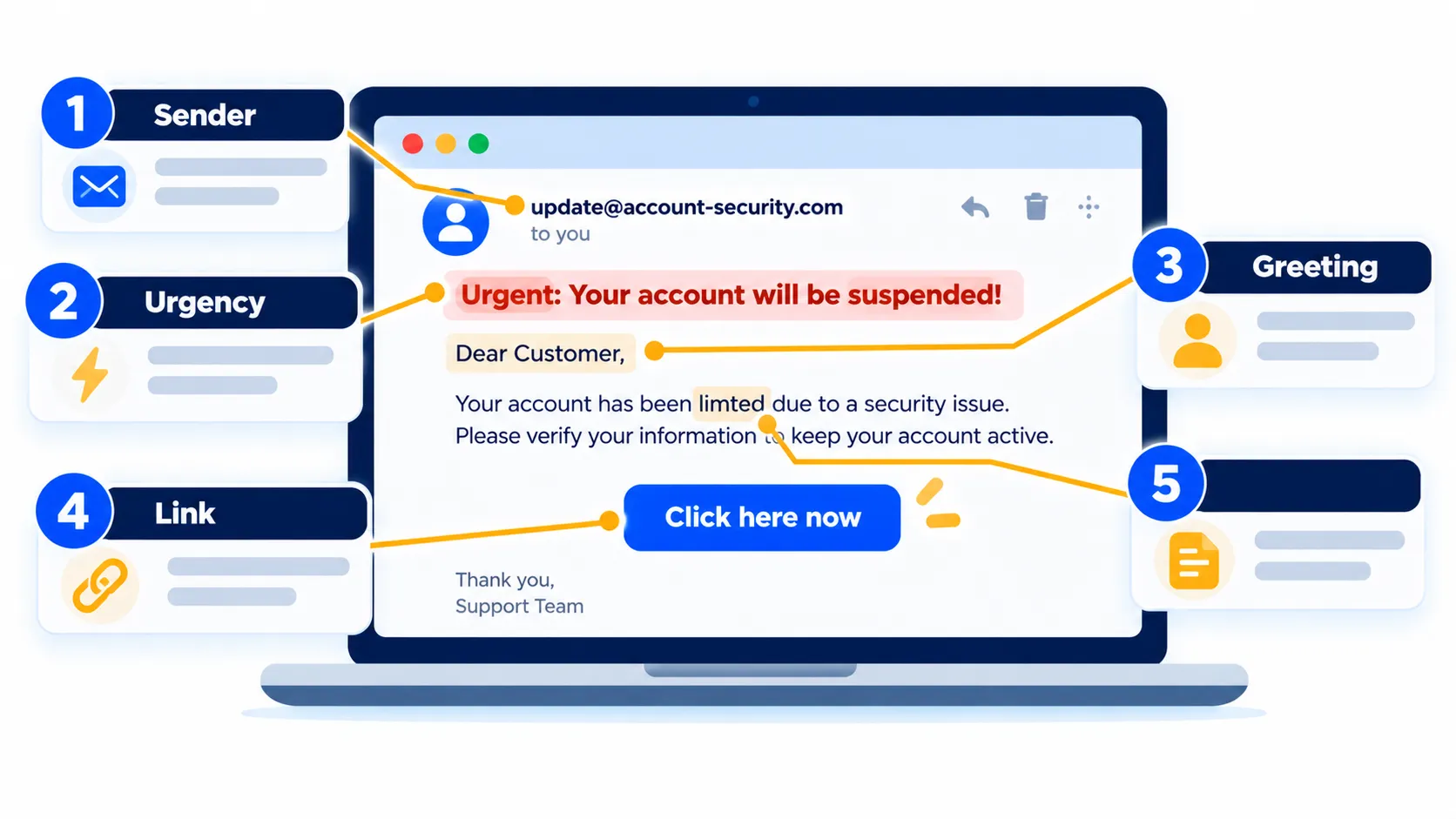
Fictional Example 1: A Phishing Email
Important: The examples below are completely fictional, written by us to show patterns. They do not copy any real company’s message, and any resemblance to a real brand is coincidental.
From: Account Security <support@secure-notice-example.test>
Subject: URGENT: Your account will be closed in 24 hours
Dear Customer,
We noticed unusual activity on your account. To avoid permanent suspension, you must verify your details immediately by clicking the link below.
[Verify My Account Now]
Failure to act will result in loss of access.
What gives it away
- Urgency and threat: “24 hours” and “permanent suspension” are designed to make you panic.
- Generic greeting: “Dear Customer” rather than your name.
- Vague company: It does not say which account or service.
- Odd sender address: The domain does not clearly belong to any company you use.
- Request to click: It wants you to follow a link to “verify”.
Fictional Example 2: A Phishing Text
[Delivery Service] We tried to deliver your parcel but the address was incomplete. Pay a small redelivery fee at: hxxp://parcel-fee-example[.]test or your package will be returned.
What gives it away
- You may not be expecting a parcel at all.
- It asks for a payment through a link rather than telling you to check your order on the official site.
- The link does not look like a company’s real web address.
- It creates time pressure (“or your package will be returned”).
We cover a related scam in how to spot fake Black Friday deals and scam shopping sites.
Fictional Example 3: A “Security Alert” Text
Security alert: a new device signed in to your account. If this was not you, reply with the 6-digit code we just sent to cancel it.
This one tries to get you to hand over a one-time code, which lets the scammer log in as you. Never share one-time codes with anyone who contacts you first. A real company will not ask you to read a code back to them.
A Quick Checklist Before You Click
- Was I expecting this message?
- Do I actually have an account with this company?
- Is the sender address or number what I would expect?
- Does it use pressure, threats or too-good-to-be-true offers?
- Does it ask for passwords, codes, card numbers or personal details?
- Where does the link really go? (On a computer, hover over it without clicking.)
- Can I check by opening the official app or typing the official address myself?
The FTC’s advice is simple: if you have an account, contact the company using a phone number or website you already know is real, not the contact details in the message. If you do not, it may be phishing: report it and delete it.
Note: Features and policies may vary by plan, region and app version, and can change at any time. Check the official help center for the latest information.
What to Do If You Clicked or Responded
- Stop. Do not enter anything else on the page.
- If you clicked a link or opened an attachment, the FTC advises updating your security software, running a full scan and removing anything it flags.
- If you gave out a password, change it right away on the real site and anywhere you reused it. Turn on two-factor authentication.
- If you shared card or bank details, call your bank using the number on your card.
- If you gave out sensitive information such as a Social Security number in the US, the FTC points to IdentityTheft.gov for steps specific to what you disclosed.
- Check for fallout. See what to do after a data breach and the warning signs that a phone is hacked.
Where to Report Phishing
United States
- Phishing email: Forward it to reportphishing@apwg.org (the Anti-Phishing Working Group).
- Phishing text: Forward it to 7726 (SPAM).
- Any phishing attempt: Report it to the FTC at ReportFraud.ftc.gov.
United Kingdom
- Suspicious email: Forward it to report@phishing.gov.uk, the National Cyber Security Centre’s reporting address. You do not need to forward emails already in your spam folder.
- Suspicious text: Forward it to 7726. The NCSC says most UK providers offer this for free.
- If you lost money or were hacked: The NCSC says to report it to the police through Report Fraud (reportfraud.police.uk, or 0300 123 2040) in England, Wales or Northern Ireland, or Police Scotland on 101 in Scotland. The NCSC itself does not take crime reports.
Your email app may also have a built-in report option, such as “Report phishing” in the message menu. Names differ by app and version. For step-by-step text reporting, see our guide on blocking spam texts, or use the help centre of your messaging app.
How to Protect Yourself Going Forward
- Use a password manager so you never type a password into a fake site by habit.
- Consider passkeys where offered, since they are tied to the real website. See passkeys explained.
- Keep your devices updated.
- Treat QR codes with the same caution as links, as we explain in fake data breach notices and QR code scams.
- Be wary of voice calls too. Read how AI voice cloning scams work.
Frequently Asked Questions
Can phishing happen without a link?
Yes. Some messages ask you to call a number, reply with a code, or open an attachment.
Is it safe to open a phishing email without clicking anything?
Opening is generally lower risk than clicking, but do not open attachments or follow links, and delete or report it.
Should I reply “STOP” to scam texts?
Do not reply to messages you suspect are scams. Use report and block tools instead.
Can a message really look like it comes from my bank?
Yes. Names and logos are easy to copy. Contact the bank through the number on your card or its official app.
What is the difference between phishing and smishing?
Phishing is the general term. Smishing means phishing by SMS text message.
The Bottom Line
Phishing works because it plays on urgency and trust. Slow down, check the sender, never use links or numbers in the message to “verify”, and go to the official website or app yourself. If something slips through, act quickly and report it.
Related Guides
- Fake Data Breach Notices and QR Code Scams: How to Tell What’s Real
- Your Email Was in a Data Breach: What to Do Next (Step by Step)
- How to Spot Fake Black Friday Deals and Scam Shopping Sites (2026)
- How to Stop Spam Calls on iPhone and Android (2026 Guide)
Explore more in our Online Safety & Privacy hub.
Disclaimer: This article is for general information only and is based on details available at the time of writing. Prices, plans, features, release dates, policies and availability can change at any time and may vary by country. Please verify the latest information on the official website of the company or product mentioned before making any decision or purchase. This is not legal, financial or security advice; if you think you have been scammed, contact your bank and the official reporting services. Next DigiTech is an independent website and is not affiliated with or endorsed by the companies mentioned; all trademarks belong to their respective owners. We are not responsible for any loss or decisions made based on this content.